
You spotted a "Dry" setting or a little water-drop icon on your AC remote, and you're wondering: what does this actually do, should I be using it, and will it cool the room or just make it less muggy? Maybe your room feels sticky even with the AC on, and you're hoping this is the fix.
Dry mode is a useful setting that many people never touch, or misuse.
This page covers what it does, when it's the right choice (and when it isn't), and the one situation where it won't solve your problem. The short version: dry mode pulls humidity out of the air without making the room much colder, and on a muggy day that can feel better than cranking the AC.
Dry mode makes your AC prioritize removing humidity over lowering temperature. It runs the compressor in short on-off cycles at a low fan speed, so air moving across the cold evaporator coil gives up more of its moisture than its heat. The room feels drier and more comfortable while the temperature barely changes, and because the compressor runs less than in cool mode, it uses less energy.
How dry mode actually works
Every air conditioner removes some humidity whenever it cools, that's just physics. Warm, humid air passes over the cold evaporator coil, water condenses out of it (like a cold drink sweating on a summer day), and drains away. Cool mode does this as a side effect of chasing a target temperature.
Dry mode flips the priority. Instead of running the compressor hard to hit a temperature, it cycles the compressor on and off at a low speed, with the fan on a low setting.
The slower airflow gives the air more contact time with the cold coil, so more moisture condenses out, but because the compressor isn't running flat-out, the room doesn't get much colder. You end up with drier air at roughly the same temperature.
The comfort trick behind this: humidity is a huge part of how hot a room feels. A room at 74°F that's very humid feels stickier and warmer than a room at 78°F with balanced humidity. So by pulling out moisture without over-cooling, dry mode can make a room feel more comfortable even though the thermostat barely moves, and without the "too cold under the blanket" overshoot you get from full cooling on a mild-but-muggy day.
When to use dry mode (and when not to)
Use it when:
- It's humid but not that hot, muggy, overcast, rainy days where full AC would make the room cold and clammy rather than comfortable.
- At night, when full cooling might leave you shivering but the air still feels heavy. Dry mode's low fan speed is also quieter, which helps for sleeping.
- After activities that add moisture, cooking, showering, drying laundry indoors, when the air feels thick.
Skip it when:
- The air is already dry. Running dry mode in low humidity just spends energy for no benefit and can leave the air uncomfortably dry (scratchy throat, dry skin). If you only want air movement, plain fan mode does that for less power.
- It's genuinely hot. On a 95°F day you want actual cooling, use cool mode. Dry mode isn't built to drop the temperature.
A practical note: on very dry days some manufacturers suggest not running dry mode for hours on end, since over-drying the air gets uncomfortable. If your throat or skin feels dry, that's your cue to switch back to fan or cool mode.
The one thing dry mode can't do
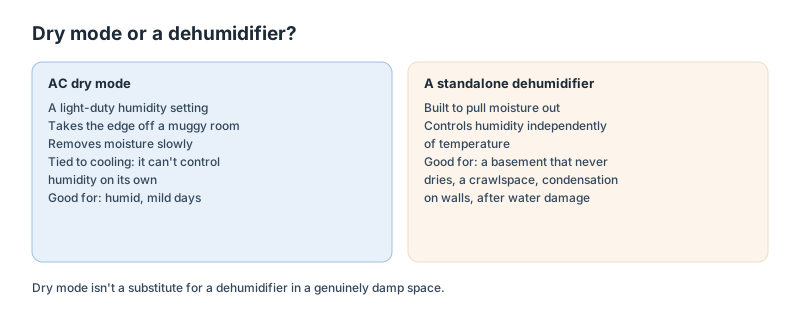
The most important limitation, if you're fighting a real moisture problem: dry mode is not a substitute for a dehumidifier.
Dry mode is a light-duty humidity setting, it takes the edge off a muggy room. But it removes moisture far more slowly than a dedicated dehumidifier, and it can't control humidity independently of temperature.
For a genuinely damp space, a basement that never quite dries, a crawlspace, condensation forming on walls, or the aftermath of water damage, dry mode won't keep up. That's a job for a standalone dehumidifier that's built to pull large amounts of water out of the air continuously.
If you're deciding between the two, see when a dehumidifier is the better tool. And if you want to know what humidity level you should actually be targeting, our ideal indoor humidity guide covers the 30–50% range the EPA recommends.
How to turn it on
It takes a few seconds on most units:
- Grab your AC remote (or find the control panel on the indoor unit).
- Press the Mode button, cycling through Cool, Heat, Fan, and Dry.
- Stop when the display shows "Dry," "Dehumidify," or a water-drop icon.
On some units, the mode button is on the front of the indoor unit instead of the remote. Once it's in dry mode, the fan and compressor settings are handled automatically, you don't need to fiddle with fan speed.
Frequently asked questions
What does dry mode on an AC do? It makes the AC prioritize removing humidity over lowering temperature. The compressor cycles on and off at a low speed with a low fan setting, so air passing over the cold coil loses more moisture than heat. You get drier, more comfortable air at close to the same temperature, using less energy than cool mode.
Does dry mode cool the room? Only slightly. Dry mode may lower the temperature a little, but that's not its purpose, it targets humidity.
On a hot day you want cool mode. On a muggy, mild day, dry mode makes the room feel more comfortable by pulling out moisture without over-cooling.
Does dry mode use less electricity than cool mode? Generally yes, because the compressor runs less, cycling on and off at lower speed rather than running hard to hit a temperature. Savings depend on your unit, your climate and how you use it, but dry mode is typically the more efficient setting when your goal is comfort in humid, not hot, conditions.
Can I use dry mode instead of a dehumidifier? For mild stickiness, yes, it takes the edge off. But for a real moisture problem (damp basement, crawlspace, condensation, water damage), no. Dry mode removes moisture slowly and can't control humidity independently of temperature.
A dedicated dehumidifier is far more effective for serious dampness. See the dehumidifier guide.
How long should I run dry mode? Run it while the air feels humid. On very dry days, avoid running it for hours continuously, since over-drying can cause discomfort (dry throat or skin). If the air feels comfortable and dry, switch to fan mode or turn it off.
About these figures
The mechanism described here, low-speed compressor cycling, a low fan speed and moisture condensing on the evaporator coil, is how air-conditioning dehumidification works across HVAC technical sources. Dry mode is a manufacturer-implemented setting, so its behavior (cycle timing, fan speed, temperature drift) varies by unit, and the energy and humidity effects here are general tendencies, since manufacturers don't publish standardized specifications for it. The 30–50% indoor humidity target is the EPA's recommendation; see our ideal indoor humidity guide.
Sources & References
Related Articles
What Is a Mini Split and How Does It Work? (Ductless AC Explained)
explainer • 10 min read
Mini Split Air Conditioners: Cost, Efficiency and Installation (2026)
guide • 11 min read
How Much Electricity Does a Mini Split Use? (Watts, kWh & Cost to Run)
data-analysis • 12 min read
Mini Split Installation Cost: What to Expect (2026 Guide)
cost-guide • 9 min read